

Three recurring sessions, each run by different people. A usability session takes an hour. A bug bash takes up to two. An exploratory session takes a quality engineer two hours of protected time. Together they catch what is wrong with the product. Each one is also a way of learning: how customers think, how the product behaves beyond your own corner of it, and where it breaks when someone looks hard.
This is a suggested way of doing it. The fundamentals are shared: who tests, what each session finds, and a decision on every finding. The how must be adapted to your organisation.
What each session gives you
Fresh-eyes usability session
One colleague from outside the product team tries to reach a goal in your product. The team watches and says nothing.
Problems in the customer funnel and onboarding, found by someone who has never seen the feature and does not know how it is supposed to work
Consistency across your products. A customer who uses several of your digital products should feel they are dealing with one company. This session shows you where that feeling breaks
Empathy inside the team. The people who built the feature watch a real person get stuck in it
Team bug bash
The team that built the product tests it together, against a theme chosen for the session.
A wider view of the product. Frontend tests backend, backend tests frontend. Everyone sees more than their own part
A shared sense of what “good” means in this product. By testing the situations customers are actually in, the team learns what matters to them, and how to build and test for it
Team building. Protected time to say what is not good about the product, and to suggest how to fix it
Charter-based exploratory session
A quality engineer works a written charter for 90 minutes, following the threads that look risky.
Space and a map for a quality engineer, or anyone able to do this work, to go deep into the things nobody has time for in a normal week
A methodical way of looking. Heuristics and a charter, rather than a hurried glance after a deploy
The deep risks: integration failures, security gaps, the edge cases that neither automated tests nor casual users reach
Three layers
Each layer catches what the others miss. The usability session finds what confuses customers. The bug bash finds what breaks in everyday use. The exploratory session finds what nobody has had time to look at. Along the way, the team learns the product and each other.
At a glance
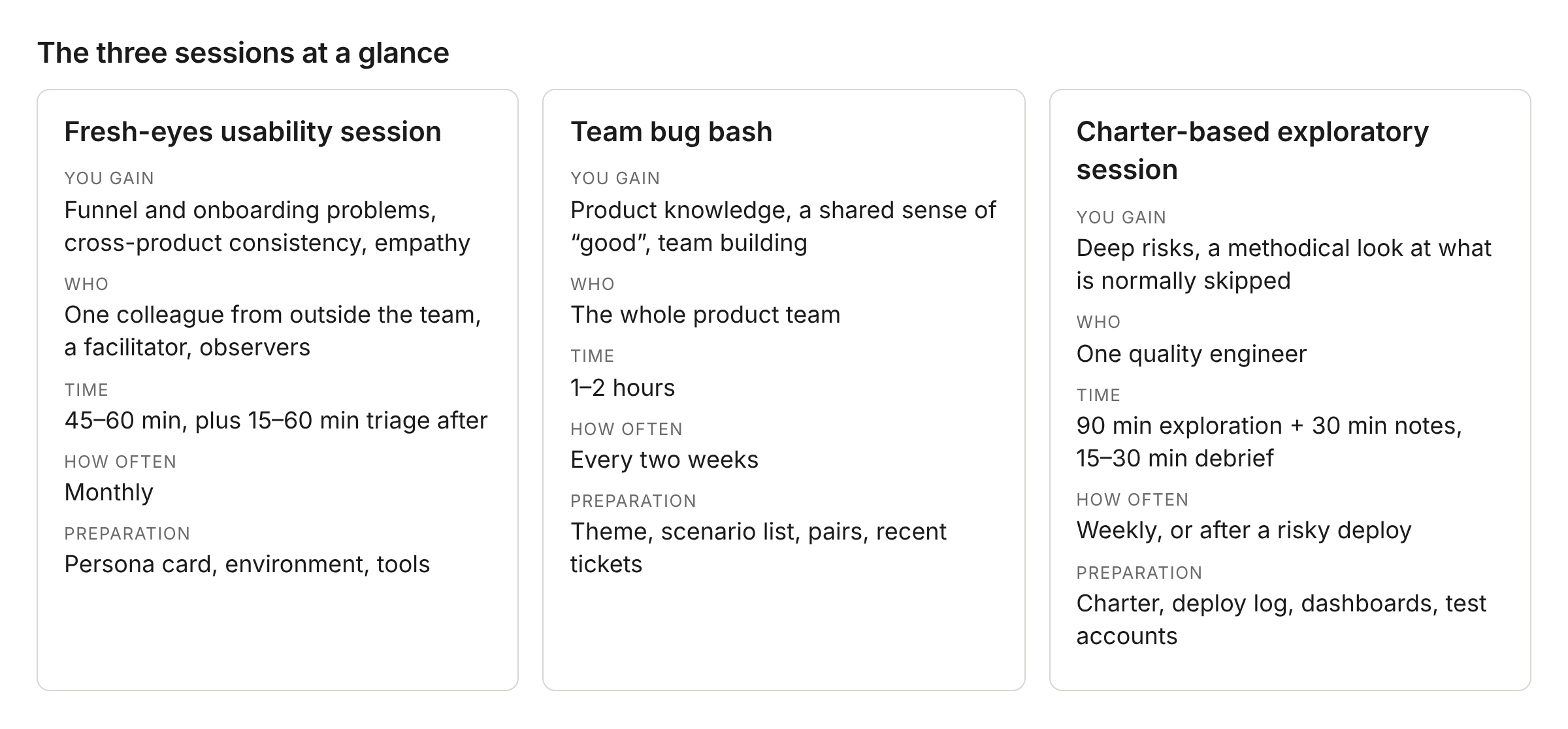
Every finding from any session gets a decision within 24 hours. The Findings Triage Cheat Sheet, published alongside this playbook, has the four buckets and what to do with each.
Each session below runs through the same five parts: what you gain, what it costs, how to run it, a worked example, and how to tell it went well. The worked example is the same throughout: Maria, a café owner who needs a website.
Session 1: Fresh-eyes usability session
In the usability literature this is a moderated usability test with a think-aloud protocol. The informal version, where you grab whoever is passing, is known as the hallway usability test.
What you gain
UX friction, confusing terminology, and the usability blockers the product team cannot see any more. This is the curse of knowledge: once you know how a feature works, you cannot imagine not knowing. The people who built it carry a detailed mental model, and that model hides every confusion point. A colleague from outside the team carries no such model. They do not know how the feature is supposed to work, only how they expect it to work, and they get stuck exactly where your customers do. A support agent who handles fifty tickets a day already knows those places. Now you watch it happen.
What it costs
Who: one employee from outside the product team: a customer support agent, a marketing specialist, someone from HR, finance or legal, or an engineer from a different product area. One facilitator. Observers from the team
Time: 45–60 minutes with the participant, strictly timeboxed. 15–60 minutes of triage after they leave
How often: monthly per product area, or before a major release
Preparation: choose the participant. Prepare the environment: production with test accounts, or staging that behaves like production. Write a persona card with a goal and no instructions. Set up a shared board, screen recording and your issue tracker
Why one person at a time: watching one person closely yields more than splitting attention across several. Run more sessions with different people.
Why people from outside the team: they carry no curse of knowledge. They do not know how the feature is supposed to work, only how they expect it to work. Support agents bring what they hear from customers every day. Marketing colleagues think in outcomes, the way customers do. Engineers from other teams bring technical intuition without feature-specific bias.
How to run it
Simplest version: give the participant a persona card with a goal, and watch them try to reach it while they say what they are thinking. Write down where they get stuck. That is the whole method.
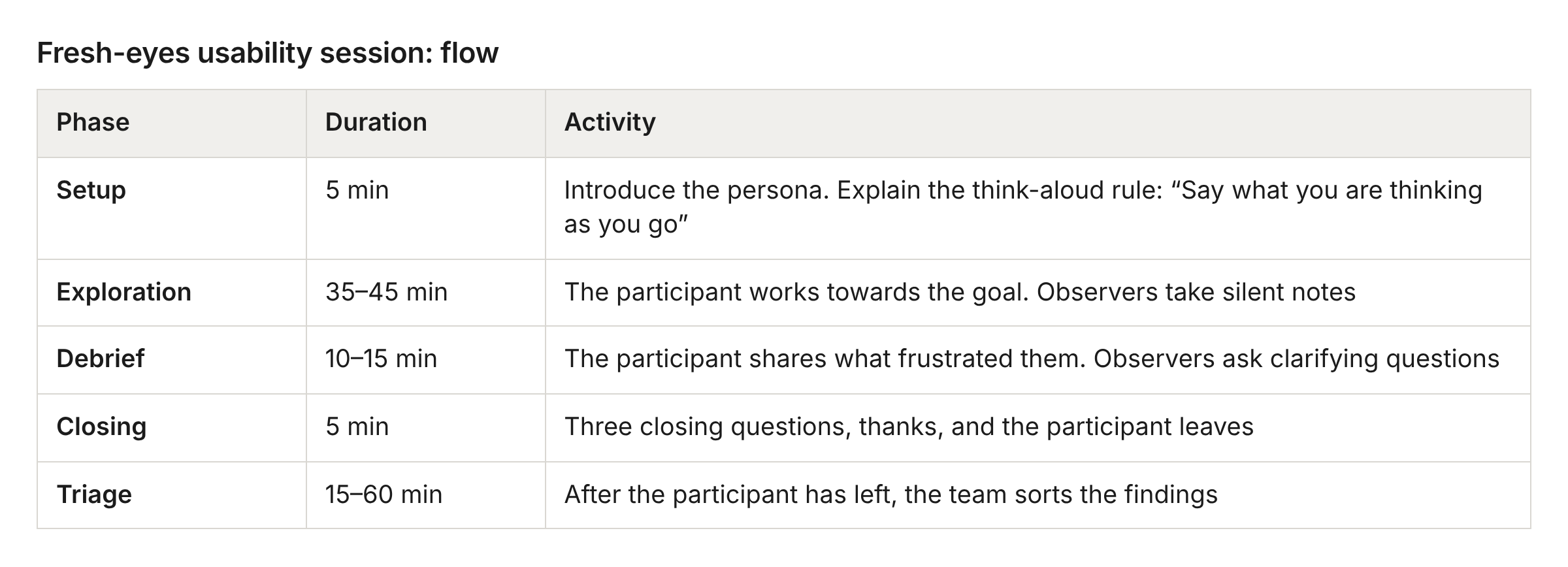
The think-aloud rule:
The participant says everything out loud: “I’m looking for…”, “I expected…”, “This confuses me…”
Observers write down friction points. They do not help and do not explain
Exact quotes are the most valuable output. “Why is this button called ‘Propagate’?” is gold
Facilitation tips:
Resist the urge to help. Confusion is the data
Ask “What did you expect to happen?” rather than “Did you see the button?”
Thank participants for the problems they found
Closing with the participant. End on a good note. Three questions:
“If you had to describe this experience to a colleague in one sentence, what would you say?” This captures their gut feeling and usually names the biggest impression
“What was the most confusing or frustrating moment?” This forces a choice, and you hear what stuck
“Would you feel confident doing this on your own at home?” An honest test of real-world usability
Then thank them properly:
“Thank you for your time today. Your fresh perspective is exactly what we need. The moments where you got stuck or confused are the ones we came for. This feedback goes straight to the product team and helps us make the product better for real customers. We’ll share what changes come out of this session, so you can see the impact you made. And if you ever notice something frustrating while using our products, tell us. We want to hear it.”
A few weeks later, send a short message showing what was fixed because of their feedback. People who see their impact come back.
Triage, after the participant leaves. Sort the findings while the context is fresh. The short version of the cheat sheet:
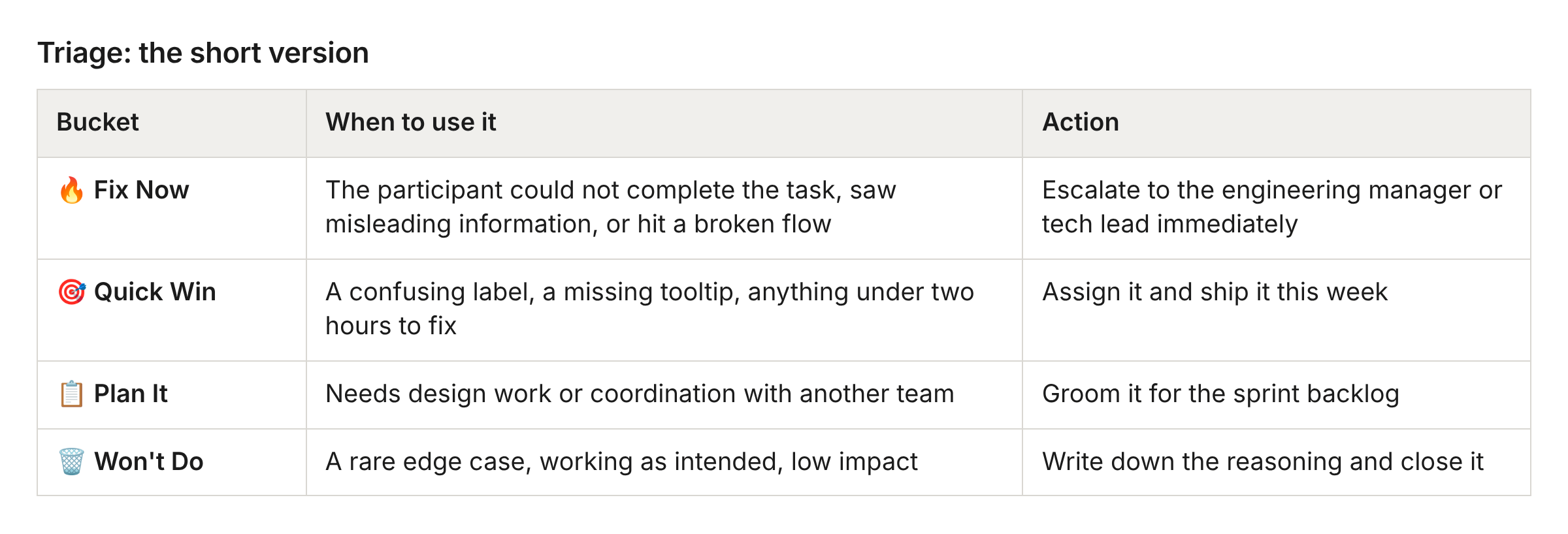
Findings that belong to another team: log them in that team’s tracker, tag their lead, and let go.
Tools: a shared board for mapping friction as it happens, your issue tracker with the session label and a product-feedback flag on every finding, and a chat thread if coordination needs one.
Example: Maria, café owner
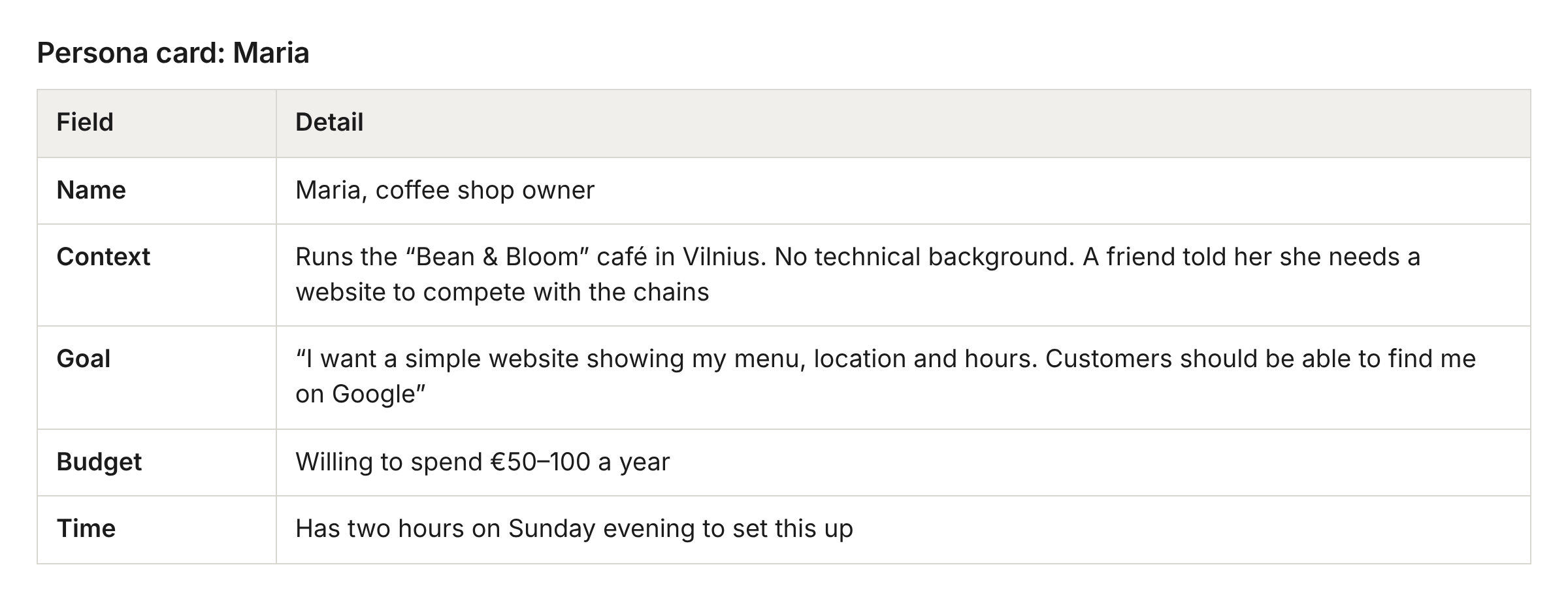
What Maria attempts (her goals, not instructions for her):
Find a hosting plan that suits a small business website
Create a website that looks professional for a café
Add menu items, photos and contact information
Connect her existing domain (beanandbloom.lt) or get a new one
Make sure the site appears on Google
What observers watch for:
Does Maria understand the difference between the hosting plans?
Can she find the website builder, and does she understand what it does?
Does she know what “DNS propagation” means when she connects her domain?
How does she react to upsells along the way?
It went well if
The participant got confused or stuck at least two or three times
You bit your tongue at least three times
Someone said “I didn’t know we could do that!” or “What does this mean?”
You captured direct quotes about the confusing moments
The team learned something surprising about how users think
The participant felt heard and thanked
Every finding had an owner before you left the room
No finding is older than four weeks and still open
At least one improvement from the previous session shipped before you ran this one
Session 2: Team bug bash
A bug bash is a scheduled session where everyone involved with a product tests it by hand, with some guidance on where to focus. It is one of the standard forms of exploratory testing in organisations that ship continuously.
What you gain
When a product changes every day, knowledge about it fragments. The developer who built a feature three months ago may not know how it behaves today. The frontend developer rarely sees what the backend does, and the other way round. A regular bug bash puts the whole team in front of the whole product, with roles swapped on purpose, so each person sees the parts they never touch. Regressions surface early. The team builds a shared answer to “is our product good enough?”, because they have tested the situations customers are actually in and seen what matters to them. And because everyone is in the room, this is the slot in the sprint where saying “this part of the product is not good” is welcome, and suggesting how to fix it is the next step.
What it costs
Who: the whole product team: frontend and backend developers, designers, the product manager, the quality engineer
Time: 1–2 hours. Never longer
How often: every two weeks, mid-sprint, same day and time, so it becomes a habit
Preparation: the tech lead, engineering manager or quality engineer picks a theme, prepares the scenario list on a shared board, assigns pairs or role swaps, pulls recent support tickets for the focus area, and has the monitoring dashboards ready if there are any
How to run it
Themes to rotate. A different theme each time keeps it fresh:
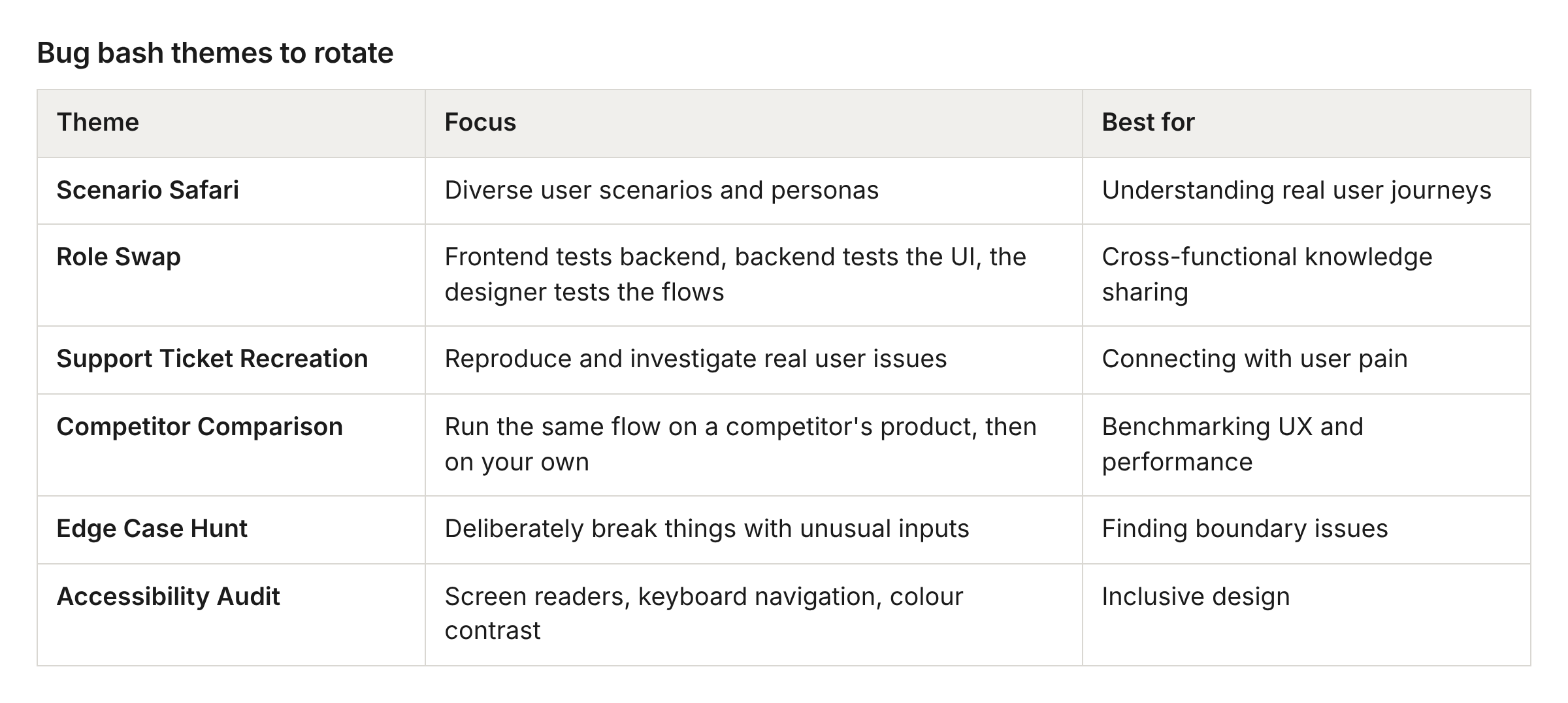
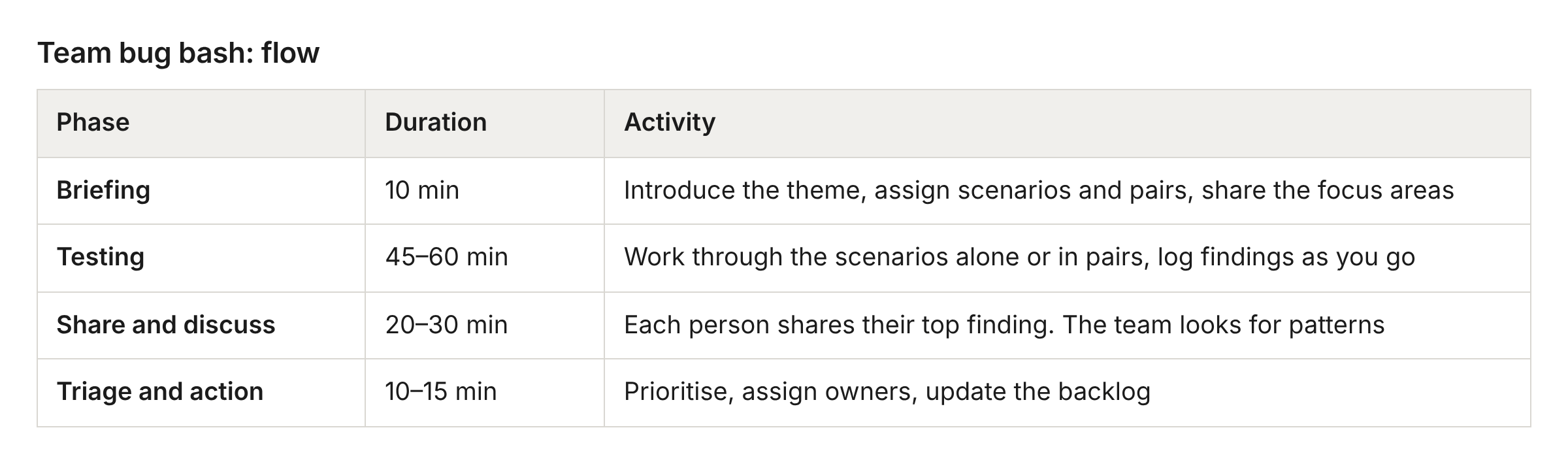
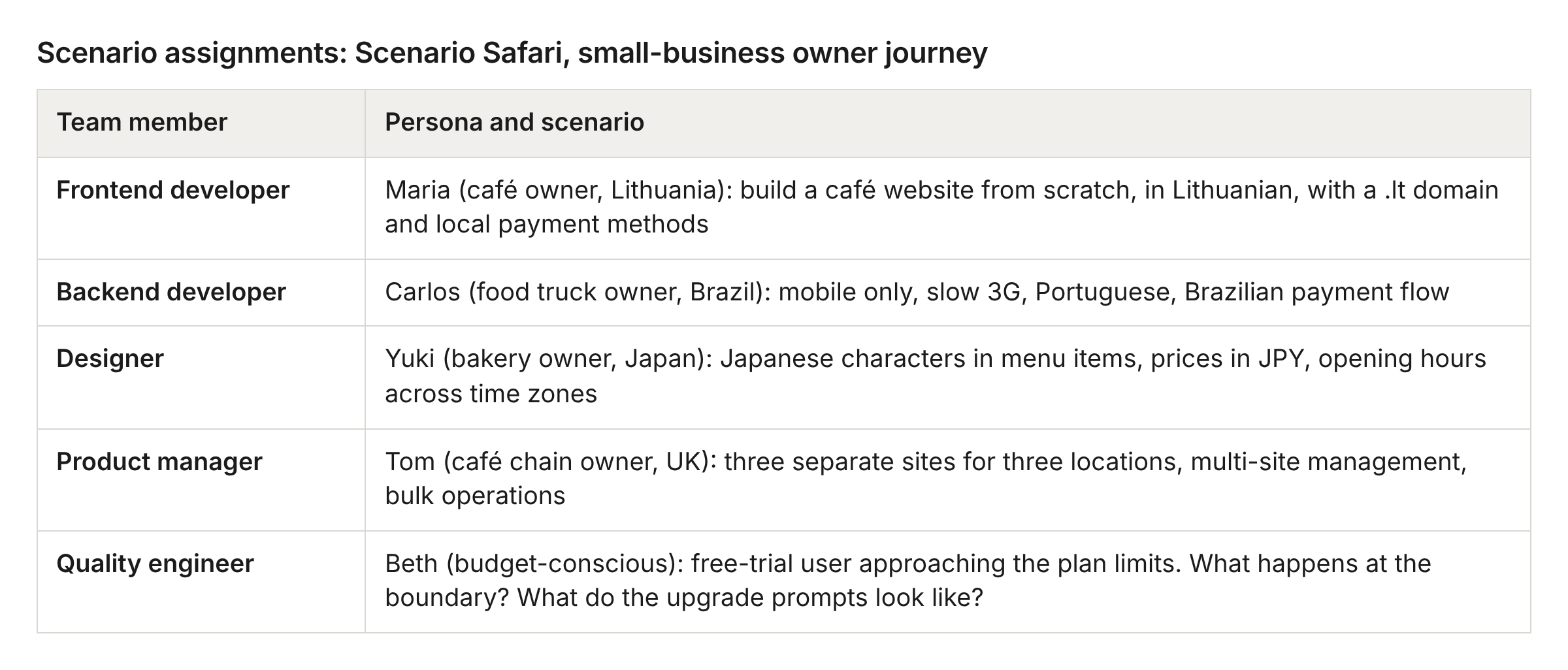
Scenario-based testing. Each participant gets specific scenarios to work through, rather than a free hour with the product:
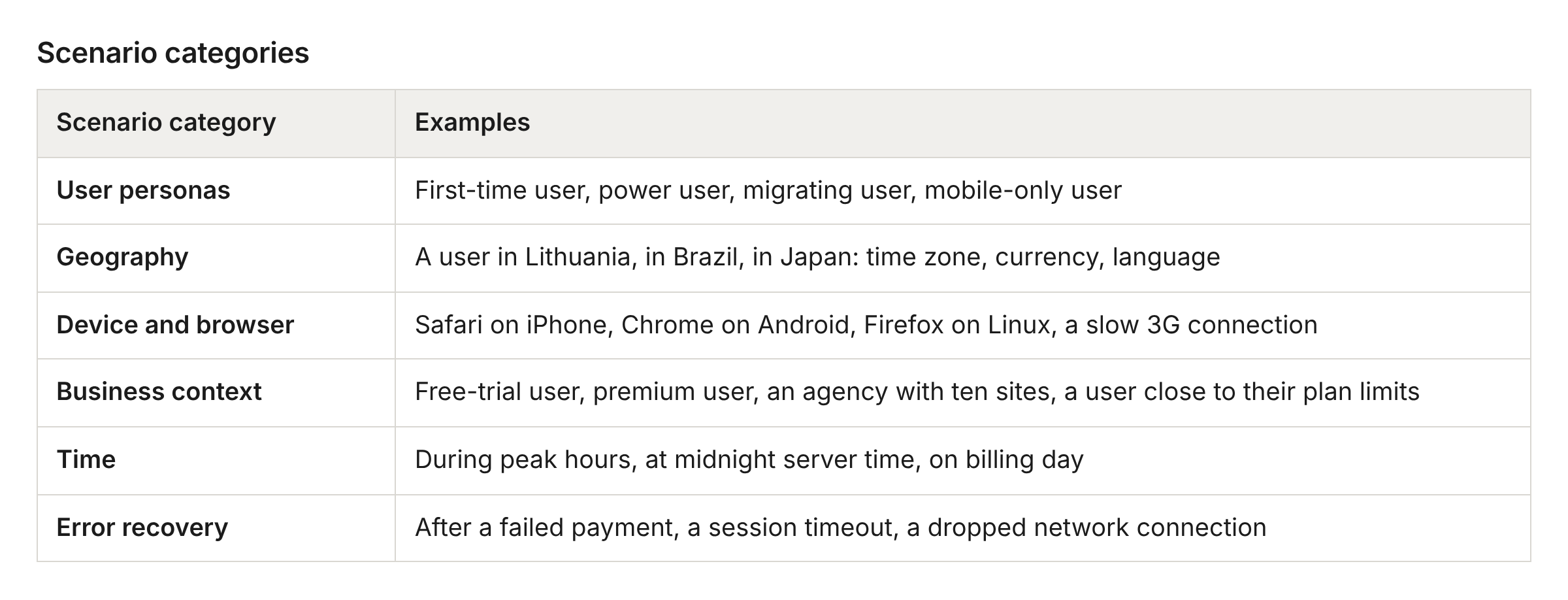
Where to look: happy paths (the core journeys must work without a hitch), error states, boundaries (maximum file sizes, longest strings, resource limits), integrations (payments, DNS, third-party APIs), production reality (real data, time zones, localisation), and regressions.
Facilitation tips:
Rotate the facilitator. Everyone leads a session eventually
Celebrate discoveries. “Great catch!” sets the tone
Keep to the timebox. Energy drops after 90 minutes
Write down “this works well” observations too
End with clear next steps: what goes to the backlog, what needs attention today
Post a summary in the team channel
Environment and tools: production, or staging that behaves like it, with the dashboards open. Your issue tracker filtered on the session label, a chat thread for “is anyone else seeing this?”, the shared board for the scenario list and the summary, browser dev tools and an API client, and the design files for visual checks.
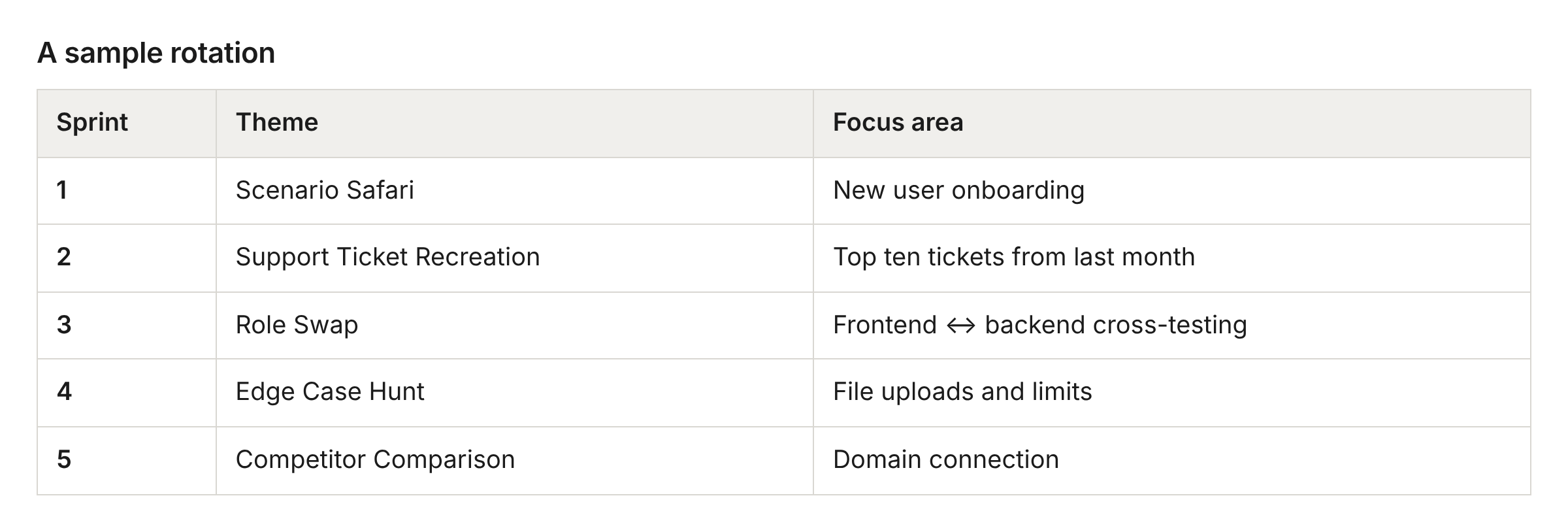
Example: Maria, from the team’s side
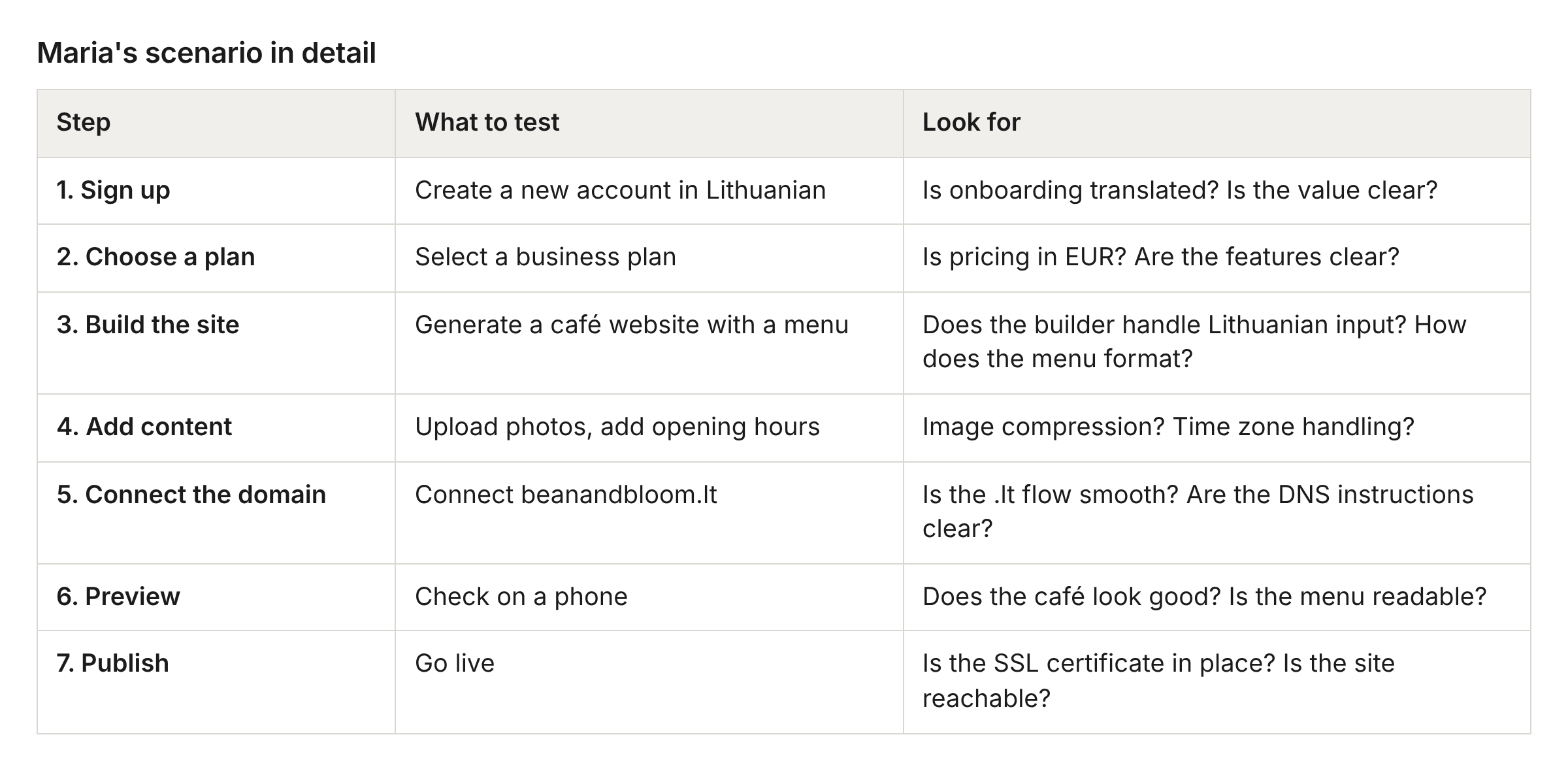
Theme: Scenario Safari, small-business owner journey. Product area: website builder.
It went well if
Someone from frontend found a backend issue, or the other way round
You finished inside the timebox with energy still in the room
At least one “let’s fix this right now” moment happened
The team found something about the product they did not know
You found at least two or three issues worth investigating
The session felt productive
Everyone contributed and shared a finding
Every next step has a ticket and an owner
Session 3: Charter-based exploratory session
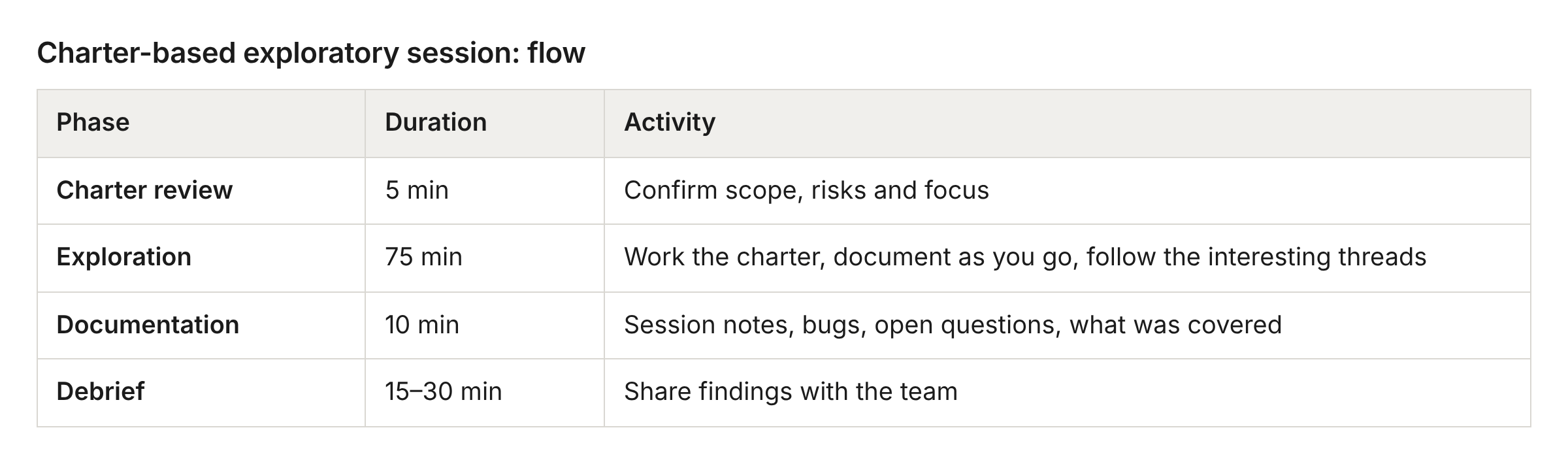
Exploratory testing is learning, designing tests and running them at the same time, guided by heuristics rather than a script. Session-based test management (SBTM) gives it structure: a charter that sets the scope, a fixed timebox, and notes that record the thinking as well as the bugs.
What you gain
Automated tests check what you expected. The usability session finds the obvious UX problems. The bug bash catches the known risks. The gap is the unknown unknowns. A charter-based session gives a quality engineer the time and the method to probe where the safety net has holes, in production, where the real issues live: actual DNS propagation delays, real third-party API behaviour, genuine data edge cases that no staging environment reproduces.
What it costs
Who: one quality engineer. Anyone trained in systematic exploration and risk-based testing can do it
Time: 90 minutes of exploration, 10 minutes of documentation, and a 15–30 minute debrief with the team, which can be written
How often: a fixed weekly slot, plus a session after any high-risk deploy. Avoid peak hours for anything risky
Preparation: review the last 24–48 hours of deployments. Check the dashboards for anything odd. Read recent support tickets for patterns. Pick the highest-risk areas: new code, complex integrations, anything security-sensitive. Write the charter. Prepare test accounts in the data states you need. Set your status to “do not disturb”
How to run it
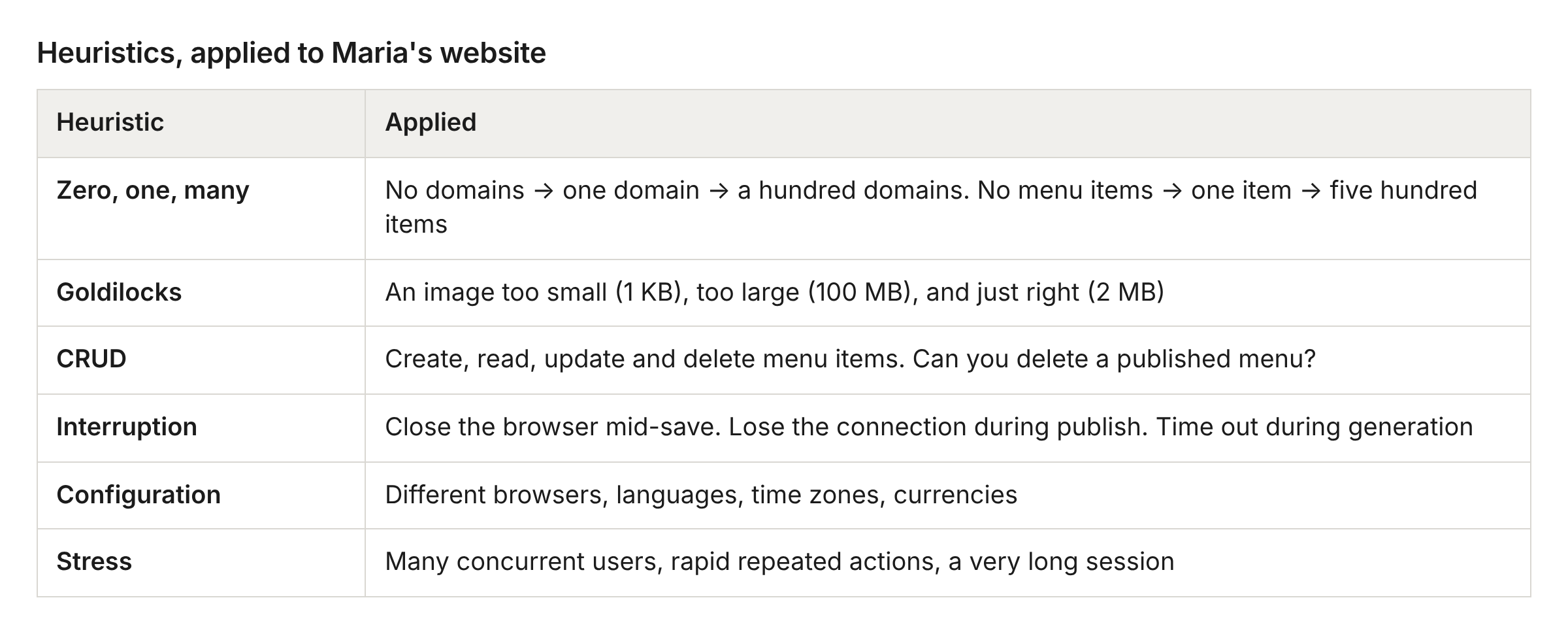
Heuristics. A heuristic is a prompt for where to look. Each one below is applied to Maria’s website:
Adversarial personas. Another way to prompt yourself:
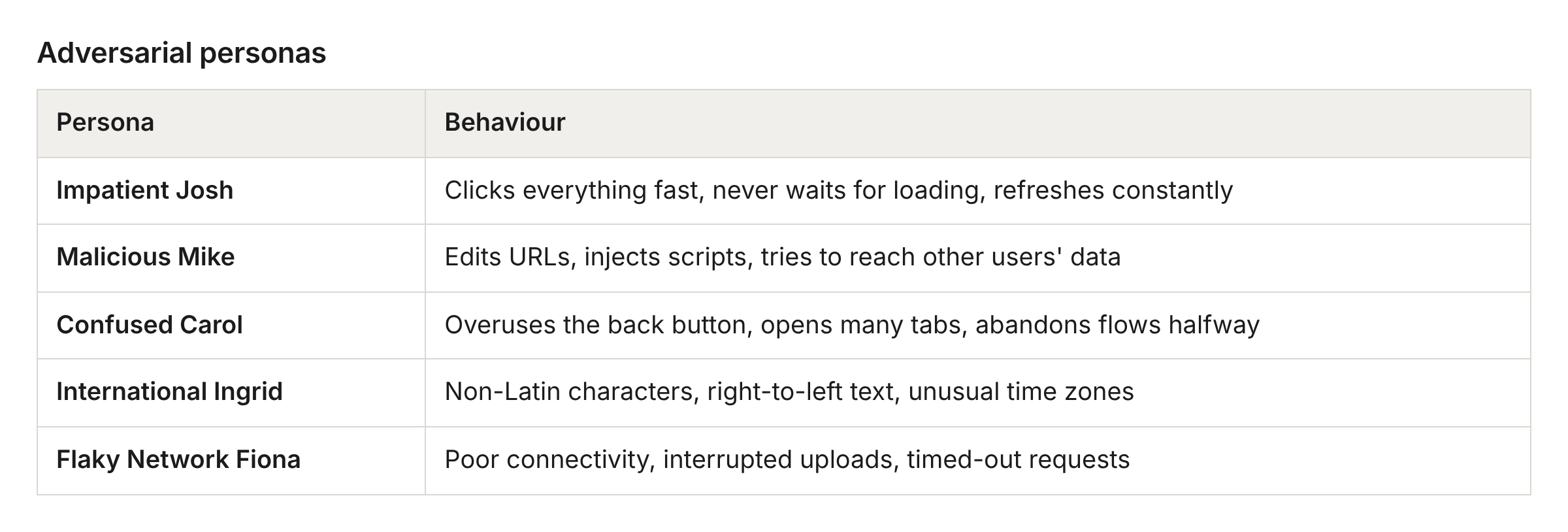
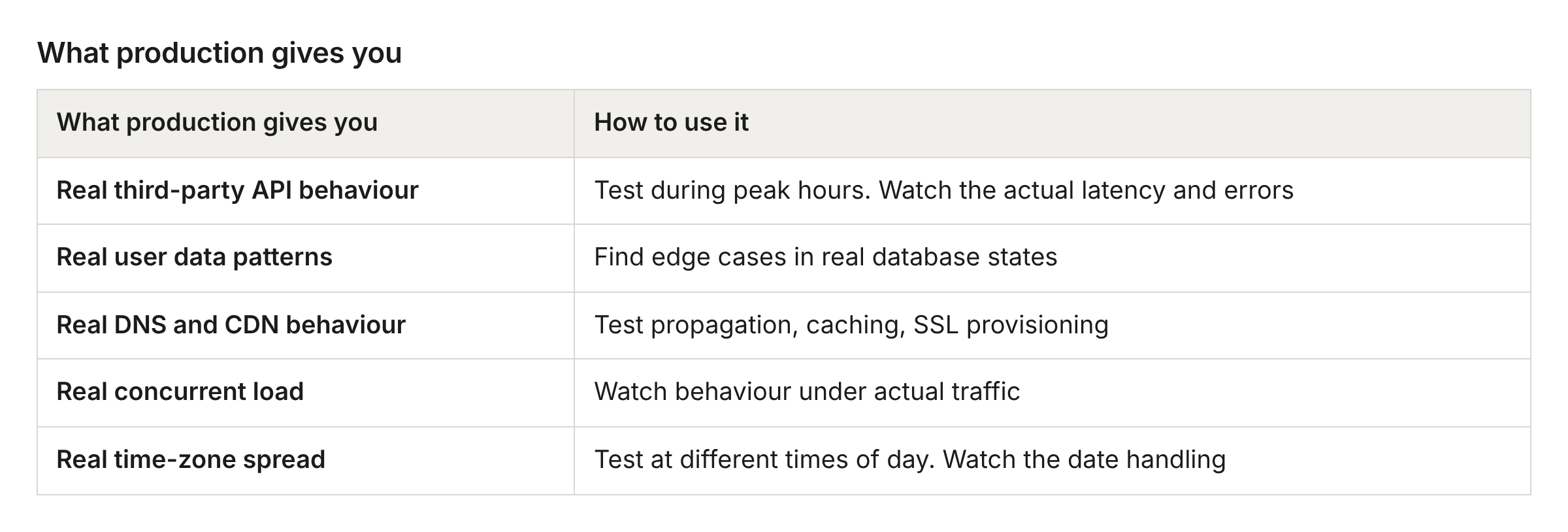
Environment: production with test accounts, real payment flows with test cards or your own. Staging for destructive testing, penetration testing and load testing at scale.
Tools: the shared board for the charter and notes, your issue tracker with the session label and the product-feedback flag, a chat thread for quick questions and the written debrief, browser dev tools, the monitoring dashboards, a proxy tool (Charles, Burp) used with care in production, and a throttling tool for bad connections.
Facilitation tips:
Protect the focus time. No chat, no meetings
Follow the interesting threads even when they leave the charter
Debrief with the product team so they see the risk landscape
Example: Maria’s domain connection, explored in depth
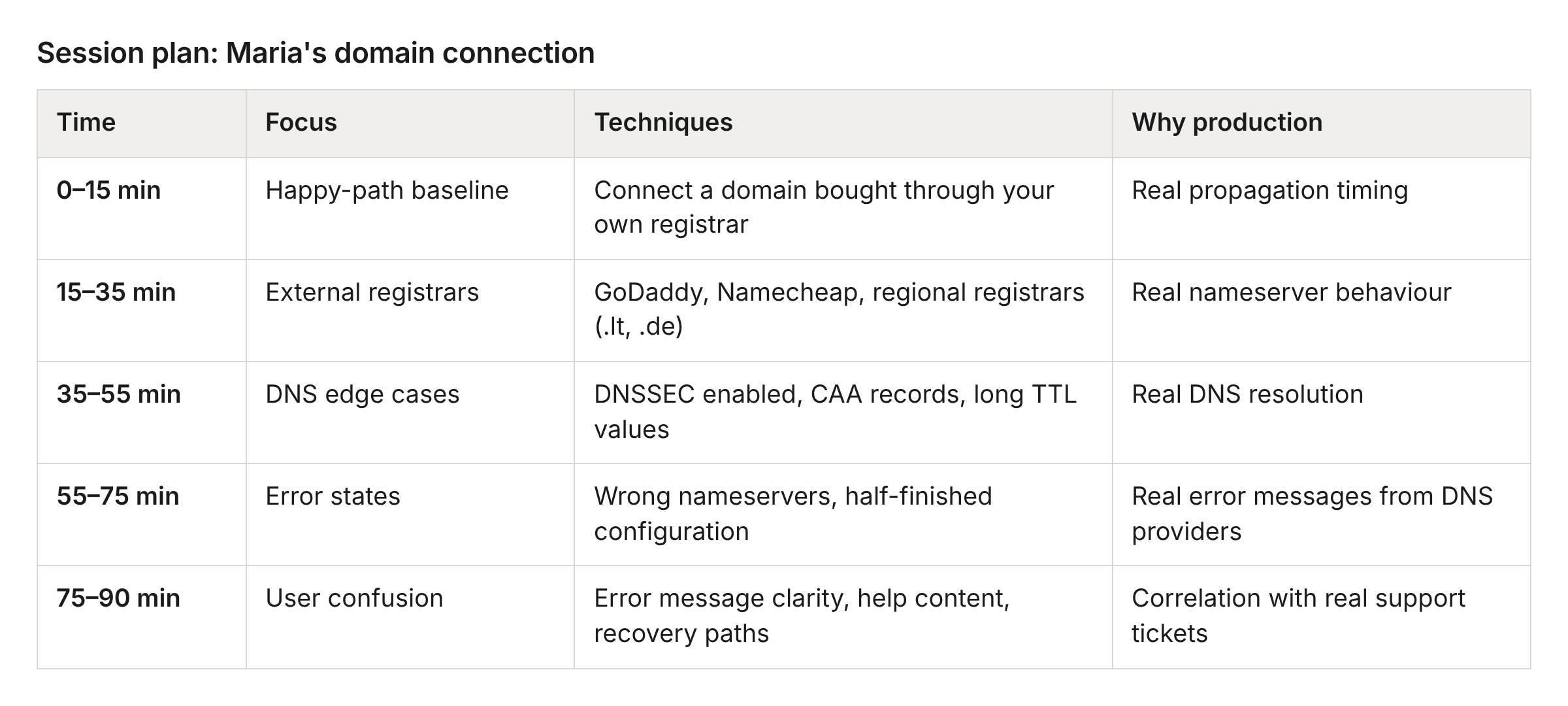
Heuristics applied:
Interruption. Start the domain connection, close the browser, come back. What state survives?
Time. Connect a domain at 23:59 server time. How is the time zone handled?
Concurrency. Open domain settings in two tabs and make conflicting changes
Configuration. Set the browser to Lithuanian. Are the error messages translated?
Production reality. Compare the actual propagation time with what the product tells users
Monitoring during the session: watch DNS error rates on the dashboard, check whether your own actions appear in the error logs, and match what you find against recent support tickets about domains.
It went well if
You followed two or three threads that were not in the charter
You found something surprising or odd, even if it was not a bug
You used at least three different heuristics
You documented your thinking as well as the bugs
You connected findings to real user scenarios or support tickets
You have concrete evidence: screenshots, logs, network traces
The developers learned something about how the system behaves
You kept your focus for the whole session
Choosing the right session
Start from the question you want answered, or the situation you are in.
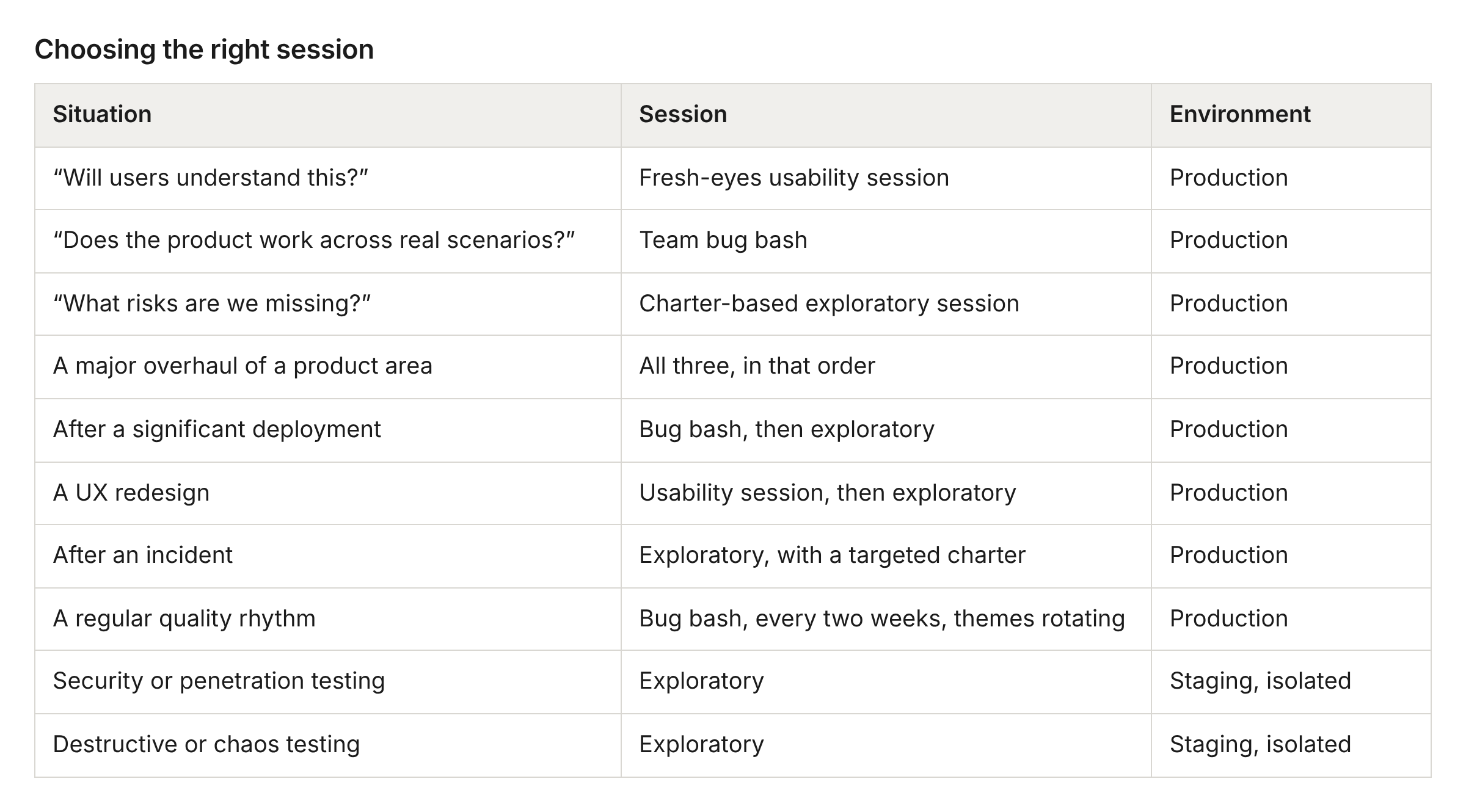
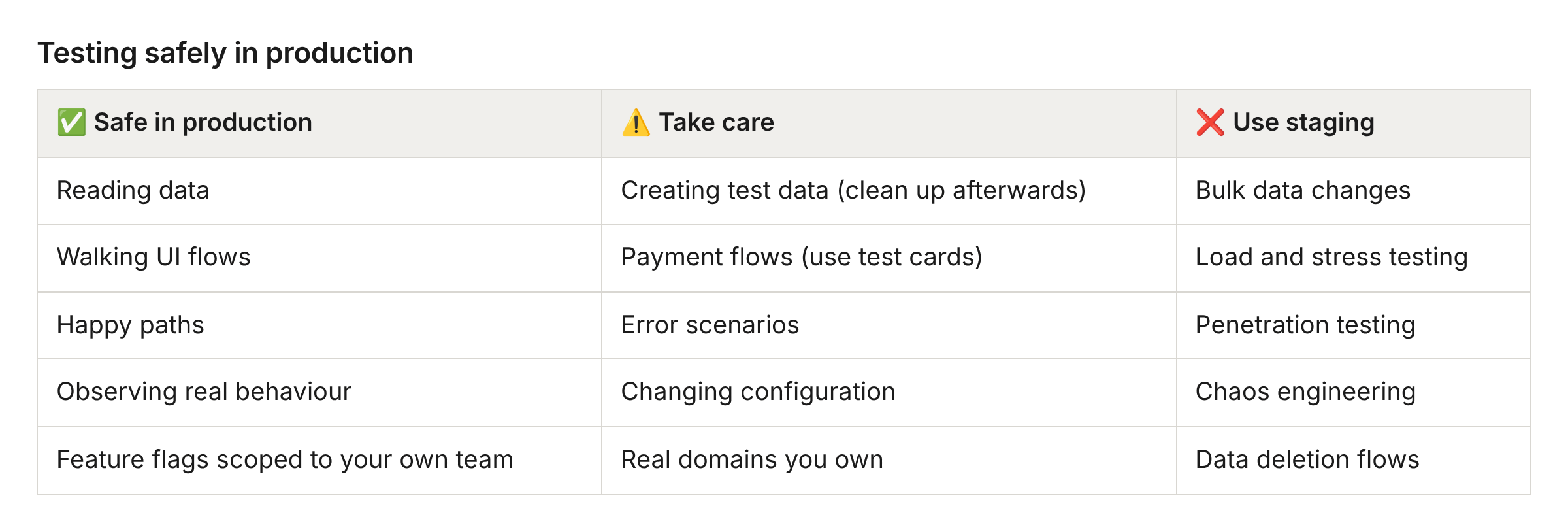
Testing safely in production
The rule: if you are not sure whether a test could affect real users, ask first or use staging.
Getting started
Four weeks to have all three sessions running.
Week 1. Run one fresh-eyes usability session. Three support agents, one at a time, in production
Week 2. Facilitate a team bug bash with the Scenario Safari theme
Week 3. Book a weekly exploratory block for the quality engineers
Week 4. Retrospective. What did we learn? What do we change?
Adjust the pace to the number of findings. A team with more findings than it can clear from week one should slow down and clear them before adding the next session.
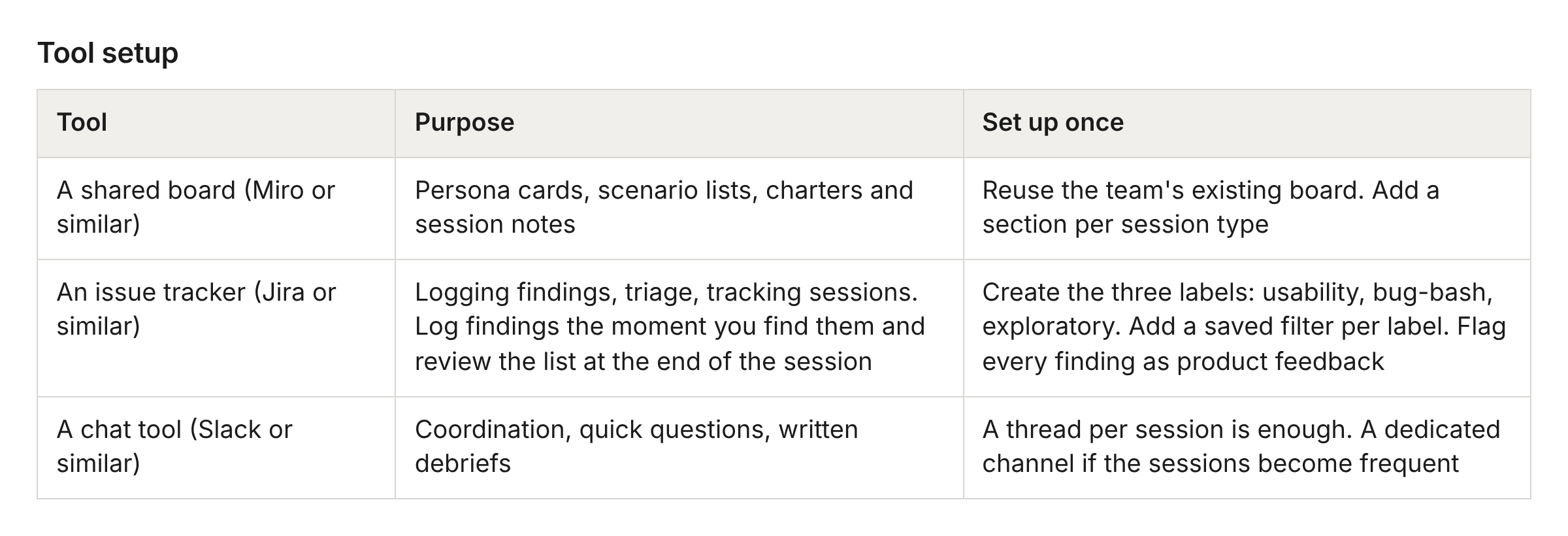
Tool setup
None of this needs new tooling. It needs three things you probably already have, set up once.
Quality is everyone’s responsibility. These three sessions are how you make that sentence mean something.