

Testing sessions produce findings. The sessions keep their value only if every finding gets a decision quickly. This cheat sheet is the decision process that goes with the three sessions in the Testing Sessions Playbook. It fits on one page, and the decision flow at the bottom fits in your head.
The rule
Every finding gets a decision within 24 hours. A decision, which may or may not be a fix. Findings that sit in limbo lose their context, waste the tester’s effort, and teach everyone that the sessions do not matter.
Step 1: Triage, straight after the session
Spend 20–30 minutes right after the session sorting the findings into four buckets.
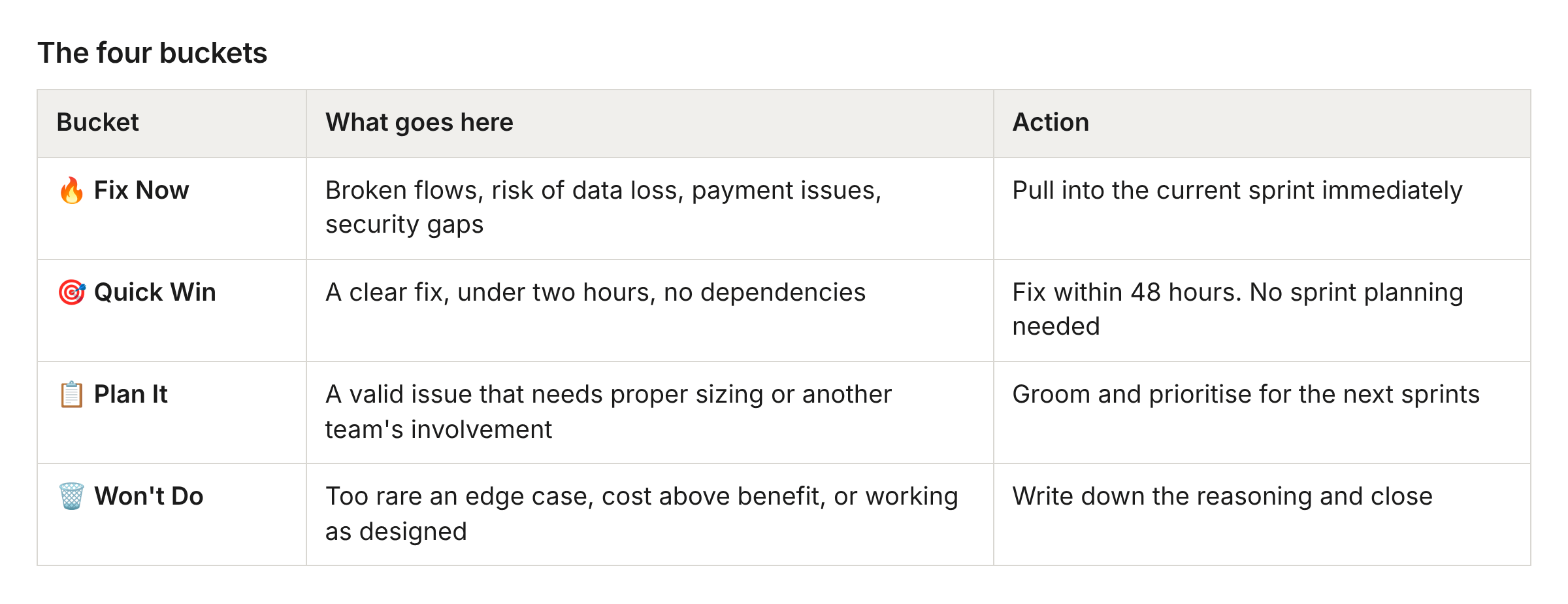
If you are unsure which bucket, ask one question: “If a paying customer hit this right now, would they contact support?”
Yes → Fix Now or Quick Win
No → Plan It or Won’t Do
Step 2: Findings that belong to another team
A session often turns up issues outside your team’s scope. That is a good sign. You tested the way a real user does, and real users do not know where one team ends and the next begins.
When a finding belongs to another team:
Log it in their tracker, using the five-minute template below
Tag their quality engineer, engineering manager or tech lead so it is seen
Post a short note in their channel with a link. “Found this during a bug bash, logged it for you” is enough
Let go. Triage and resolution are now theirs
What stays with you:
Enough context in the ticket that they can reproduce it
A direct message if it is a Fix Now. Logging alone is not enough for those
What is on them:
Triaging it in their own sprint rhythm
Choosing the bucket
Coming back to you if they need more context
If findings keep piling up for one team, raise it with their quality engineer or engineering manager. A steady stream from the same place usually points to a quality gap that needs attention above team level.
Step 3: The five-minute finding template
A finding needs just enough context to act on later. Capture the essentials and stop there.
What I found:        one sentence
Steps to reproduce:  numbered, specific
Expected vs actual:  what should happen, what happened
Evidence:            screenshot, video link or network trace
Impact:              who is affected, how often it might occur
Suggested bucket:    Fix Now / Quick Win / Plan It / Won't Do
Log it in your tracker during the session or straight after. Add the session label (usability, bug-bash or exploratory) and the product-feedback flag. Your team may have its own labelling conventions on top of these.
Step 4: Quick Wins. Just do them
Quick Wins are the low-hanging fruit. They build momentum and show the team that sessions lead to visible improvements.
A Quick Win is:
Under two hours to fix
Free of design decisions
Free of cross-team dependencies
Clearly reproducible
Who does them: whichever engineer is available. Often the person on support duty or someone who finished a task early. Quick Wins need an engineer with two hours. They do not need product manager approval.
Track them: add a quick-win label. At the sprint retrospective, count how many you cleared. The number is worth celebrating.
Step 5: Fix Now. Escalate well
These are production risks that cannot wait for sprint planning.
Escalation path:
Raise it immediately with the tech lead or engineering manager
They decide whether to interrupt the current sprint
If yes: pull it in, assign an owner, announce it in the team channel
If no: say why. Monitoring is in place, a workaround exists, or similar
What qualifies as Fix Now:
Users losing data or money
Security vulnerabilities
A core flow completely broken: sign-up, checkout, publish
An issue that is already generating support tickets
The business case: every hour a critical bug stays in production is potential churn. A user who fails to publish their website today goes to a competitor today.
Step 6: Plan It. Into the sprint machinery
Most findings land here. The aim is that they enter the backlog groomed and ready, as items a planning session can pick up without archaeology.
Before sprint planning:
The quality engineer or the finder sets a priority
The product manager weighs it against the roadmap
The engineering manager confirms it fits the capacity
The finding is sprint-ready, with acceptance criteria
A rhythm that works:
Findings from Monday to Wednesday are groomed by Thursday
Findings from Thursday and Friday are groomed by Monday
Sprint planning pulls from the groomed backlog
Findings age badly. Re-triage or close anything older than two sprints that still has no decision. Context decays fast.
Step 7: Won’t Do. Close with clarity
Some findings will never become fixes. That is fine. An open ticket with no decision is the problem.
When to use Won’t Do:
An edge case affecting under 0.1% of users, with no security or data impact
The cost of the fix far outweighs the user impact
An intentional design decision. Write down why
A duplicate of a known issue
How to close well:
Add a comment with the decision and the reasoning
Tag the person who found it, so they are not left wondering
Close the ticket
Why this matters: the tester gave their time and attention. A clear outcome respects that. “We decided not to fix this because X” is a valid outcome. Silence is not.
Quick reference: decision flow
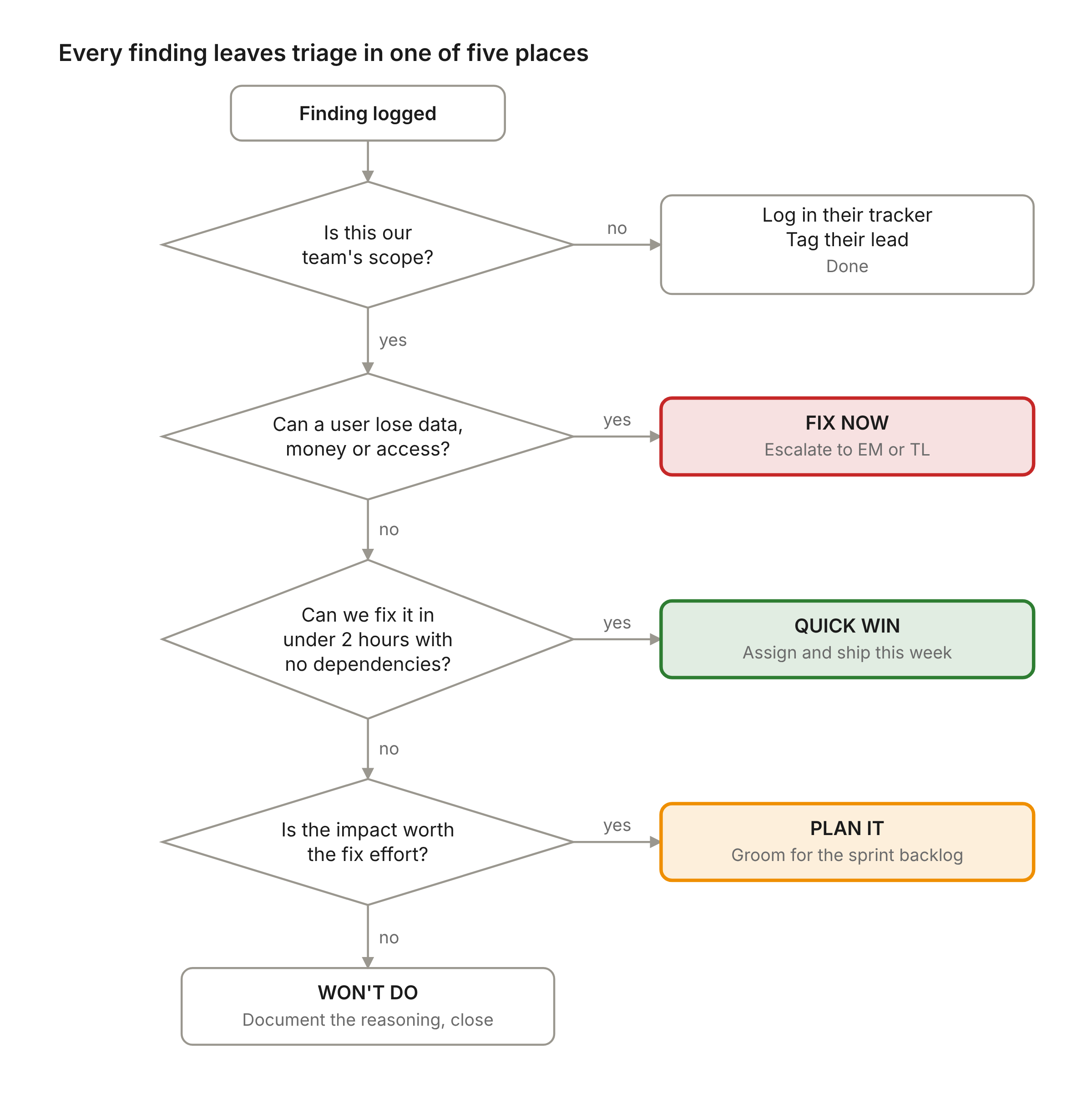
A finding outside your squad’s scope leaves the flow at the first decision. Everything else ends in one of the four buckets.
Making it stick
Quality engineers running sessions:
Triage your own findings before logging them. Suggest the bucket
Include reproduction steps and evidence from the start
Tell the tech lead or engineering manager about a Fix Now in person. Logging it and waiting is too slow
Engineering managers and tech leads:
Review new findings daily. Five minutes is enough
Let engineers take Quick Wins without asking. A two-hour fix needs no permission
Celebrate findings at the retrospective, alongside the features that shipped
Product managers:
Treat groomed findings like any other backlog item
Balance findings against roadmap work. Quality is a feature
Close the loop. Tell the team what shipped because of their findings
What you get
When this flow works:
Faster fixes. The low-hanging fruit ships in days
A cleaner backlog. No ghost tickets from six months ago
Motivated testers. Their work leads to visible outcomes
Healthier production. Fewer surprises, fewer support escalations
A stronger culture. Quality becomes everyone’s job, with a process behind it
Stuck on a triage decision? Ask your quality lead or engineering manager. Over-communicating is cheap. A finding left to rot is not.